
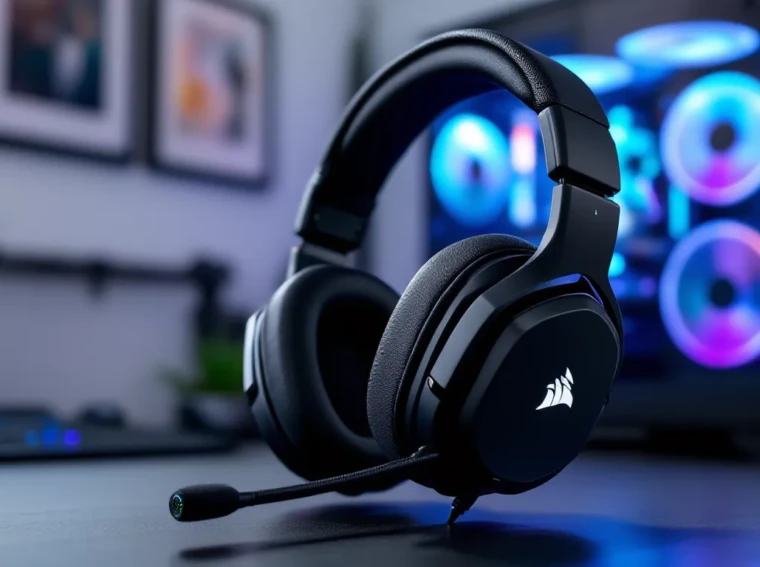
The Corsair HS70 Pro Wireless has been around since 2018, but in 2026, it’s still sitting on the shelves of most major retailers, and that’s not by accident. While newer headsets flash RGB lighting and promise surround sound wizardry, the HS70 Pro Wireless keeps doing what it’s always done: delivering clean audio, reliable wireless performance, and all-day comfort without very costly. But is a seven-year-old design still worth your money when competitors have been iterating like crazy?
This isn’t a nostalgia piece. The HS70 Pro Wireless has held its ground because Corsair nailed the fundamentals, 50mm neodymium drivers, a detachable mic that doesn’t sound like you’re underwater, and battery life that lasts through those marathon weekend sessions. It’s not perfect, though. The lack of Xbox wireless support and minimal RGB might turn off some gamers, and the competition has gotten fierce. Whether you’re on PC, PlayStation, or just looking for a solid wireless option that won’t drain your wallet, this guide breaks down everything you need to know about the HS70 Pro Wireless in 2026.
Key Takeaways
- The Corsair HS70 Pro Wireless delivers exceptional value at $70–$90 with 16-hour battery life, comfortable all-day wear, and balanced 50mm drivers ideal for competitive gaming on PC and PlayStation.
- Its 2.4GHz low-latency wireless connection and detachable Discord-certified microphone provide reliable performance for both gaming and online communication without flashy extras or premium pricing.
- The HS70 Pro is incompatible with Xbox wireless support and lacks USB-C charging, making it better suited for PC and PlayStation gamers rather than those on multiple platforms.
- With clean audio clarity, strong positional cues for FPS titles, and simple plug-and-play setup, the Corsair HS70 Pro Wireless remains a dependable mid-range option that prioritizes functionality over RGB aesthetics.
- Compared to competitors like the Logitech G733 and SteelSeries Arctis 7, the HS70 Pro trades some advanced features for lower cost and superior battery life, making it ideal for budget-conscious gamers.
What Makes the Corsair HS70 Pro Wireless Stand Out?
In a market flooded with wireless gaming headsets that all promise the same thing, the HS70 Pro Wireless differentiates itself through consistency and value. The headset operates on a 2.4GHz wireless connection via a USB dongle, delivering low-latency audio that holds up in competitive shooters and fast-paced MOBAs. Unlike Bluetooth headsets that introduce lag, the HS70 Pro’s wireless tech keeps audio in sync with what’s happening on-screen.
The 50mm neodymium drivers are the real workhorses here. They produce a frequency response range of 20Hz to 20kHz, which translates to clear highs, present mids, and bass that doesn’t muddy everything else. Gamers who’ve used it across titles like Call of Duty, Valorant, and Elden Ring report solid positional audio, footsteps and directional cues come through without needing software tricks.
What really sets the HS70 Pro apart is the battery life. Corsair rates it at up to 16 hours on a single charge, and real-world testing backs that up. You’re not constantly hunting for a charging cable mid-session, which is more than can be said for some competitors that tap out at 10-12 hours.
The headset also keeps things simple. There’s no over-engineered app dependency or forced firmware updates that brick functionality. You plug in the dongle, it works. For gamers who just want reliable audio without fiddling with settings, that simplicity is a feature, not a bug.
Finally, the detachable microphone is a smart touch. It’s Discord-certified, meaning it meets baseline standards for voice clarity, and when you don’t need it, you can yank it off and use the headset for music or watching streams. Not everyone needs a boom mic 24/7, and Corsair gets that.
Design and Build Quality
Construction Materials and Durability
The HS70 Pro Wireless doesn’t feel premium in the way an Audeze or SteelSeries Arctis Nova does, but it’s not cheap either. The frame is mostly plastic with metal reinforcements in the headband. The yoke connecting the ear cups to the headband is metal, which is where most headsets snap after a year of abuse. Corsair clearly learned from past mistakes here.
The plastic is matte, not glossy, so it doesn’t turn into a fingerprint magnet. The overall weight sits at around 330 grams, which is light enough to forget you’re wearing it but hefty enough to feel like it won’t break if you accidentally sit on it. After years of use, owners report the hinges and headband holding up well, though the faux leather on the ear cups does start to flake eventually, that’s true for almost every headset in this price range, though.
Comfort and Fit for Extended Gaming Sessions
Comfort is where the HS70 Pro earns its keep. The memory foam ear cups are covered in faux leather, and they’re deep enough to fit most ear shapes without pressing against the drivers. If you’ve got larger ears, you won’t feel squeezed like you do with some of the smaller on-ear designs.
The headband padding is generous, distributing the weight evenly across the top of your head. Even after 4-5 hour sessions, there’s no painful hotspot on the crown. The clamping force is moderate, tight enough that the headset won’t slide off if you lean back, but not so tight that it gives you a headache.
One minor gripe: the ear cups can get warm during long sessions. The faux leather doesn’t breathe as well as fabric or mesh alternatives, so if you’re gaming in a hot room, expect some sweat buildup. Not a dealbreaker, but worth noting if you run hot.
Adjustability and Ear Cup Design
The headband adjustment uses a simple notched slider system. It clicks into place, so you’re not constantly readjusting mid-game. There’s enough range to fit smaller heads and larger ones without maxing out the extension.
The ear cups swivel about 90 degrees, which helps them sit flat around your neck when you take a break. They don’t fold completely flat for storage, though, so tossing the HS70 Pro into a backpack takes up more space than collapsible models. The ear cup rotation is smooth, not stiff, and after years of use, they don’t develop that annoying creaking sound some cheaper headsets get.
The left ear cup houses the volume wheel and the mic mute button. The volume wheel is chunky and easy to find without looking, which is exactly what you want during a clutch round. The mute button is a physical toggle, not a soft touch sensor, so there’s tactile feedback when you hit it.
Audio Performance and Sound Quality
50mm Neodymium Drivers Breakdown
The 50mm neodymium drivers are tuned with a slight bass emphasis, which works well for explosive action games but doesn’t overpower everything else. The frequency response is 20Hz to 20kHz, standard for gaming headsets, but the implementation matters more than the spec sheet.
Bass is punchy without being boomy. Explosions in Battlefield 2042 or Apex Legends have weight, but you can still hear footsteps and reloads clearly. Mid-range is clean, so voice lines and dialogue in single-player games like Baldur’s Gate 3 come through without sounding muffled. Highs are present but not sharp, no ear-piercing treble when glass shatters or metal clangs.
Soundstage is respectable for a closed-back headset. You won’t get the wide, open feel of an open-back design like the DT 990 Pro, but directional audio is accurate enough for competitive play. In CS2 and Valorant, you can reliably pinpoint enemy positions based on audio cues, which is what matters.
Gaming Audio Experience Across Different Genres
In FPS titles, the HS70 Pro holds its own. Footsteps in Call of Duty: Warzone are distinct, and gunfire has enough bass to feel impactful without drowning out environmental sounds. Directional audio is solid, left, right, front, and back are all clear, though vertical audio (above/below) isn’t as precise. That’s a limitation of stereo headsets in general, not unique to the HS70 Pro.
For RPGs and single-player games, the audio is immersive. The orchestral score in The Witcher 3 or Elden Ring sounds full, with strings and brass coming through cleanly. Dialogue is crisp, so you’re not straining to hear NPCs during cutscenes. The bass doesn’t bleed into the mids, which keeps complex soundtracks from turning into mush.
MOBAs and strategy games don’t demand much from a headset, but the HS70 Pro handles them fine. Ability sound effects in League of Legends or Dota 2 are clear, and you can distinguish between different audio cues during chaotic teamfights. Voice comms stay intelligible even when the action ramps up.
Battle royales benefit from the HS70 Pro’s balanced tuning. In PUBG or Fortnite, you can hear distant gunfire, vehicle engines, and player movements without cranking the volume to ear-damaging levels. The soundstage isn’t as wide as competitors like the SteelSeries Arctis 7, but it’s good enough to give you a competitive edge.
Music and Media Playback Quality
The HS70 Pro isn’t marketed as a music headset, but it handles Spotify and YouTube surprisingly well. The bass-forward tuning works for genres like hip-hop, EDM, and rock. Kick drums and basslines have punch, and vocals sit in the mix without getting buried.
For jazz, classical, and acoustic music, the soundstage feels a bit cramped. Instruments don’t have as much separation as they would on audiophile-grade cans, but that’s expected at this price point. Streaming movies and shows is fine, dialogue is clear, and sound effects have presence.
If you’re planning to use the HS70 Pro as an all-purpose headset for gaming, music, and media, it’s capable. Just don’t expect studio monitor levels of detail.
Microphone Quality and Communication
Detachable Microphone Features
The detachable unidirectional microphone is one of the HS70 Pro’s stronger features. It’s Discord-certified, which means it meets baseline standards for voice clarity and noise rejection. The mic plugs into the left ear cup via a 3.5mm jack, and when you don’t need it, you can pull it out completely.
The mic arm is flexible but not floppy. You can bend it to get the capsule closer to your mouth, and it holds position without drooping mid-game. There’s a foam windscreen on the mic, which helps reduce plosives (the popping sounds from “p” and “b” words) and breath noise.
The mic mute button is on the ear cup, not on the mic itself. It’s a physical toggle, so you get tactile feedback when you mute. A small red LED on the mic lights up when you’re muted, which is a nice visual cue if you forget to unmute before talking.
Voice Clarity in Online Gaming and Streaming
Voice quality is solid for Discord, in-game chat, and casual streaming. The mic picks up your voice clearly without making you sound tinny or nasally. Background noise rejection is decent, keyboard clacks and mouse clicks are audible but not overwhelming. If you’re in a quiet room, your teammates will hear you fine. If you’re gaming in a louder environment (roommates, pets, open windows), some of that will bleed through.
For streaming, the HS70 Pro mic is passable but not ideal. It’s fine for starting out or streaming casually with friends, but if you’re building a Twitch or YouTube channel, you’ll want to upgrade to a dedicated USB mic like a Blue Yeti or HyperX QuadCast. The HS70 Pro mic lacks the richness and clarity that viewers expect from serious streamers.
Compared to other gaming headset mics, it’s middle-of-the-pack. It’s clearer than the stock mic on the HyperX Cloud Flight but not as good as the SteelSeries Arctis 7’s ClearCast mic. For the price, it gets the job done.
Wireless Connectivity and Battery Life
2.4GHz Wireless Range and Stability
The HS70 Pro Wireless uses a 2.4GHz USB dongle for connectivity. Corsair rates the range at up to 40 feet (12 meters), and in real-world testing, it holds up. You can walk across a medium-sized apartment without the audio cutting out, which is useful for grabbing a drink or snack without missing callouts.
The dongle is small, about the size of a thumb drive, and plugs into any USB Type-A port. It’s plug-and-play on PC and PlayStation, no drivers needed. The connection is stable, even in environments with multiple wireless devices (routers, smartphones, other peripherals). Interference is rare, and when it does happen, it’s a brief crackle, not a full dropout.
One downside: the dongle doesn’t have a storage spot on the headset, so it’s easy to lose if you’re traveling. Some users stick it in the ear cup when not in use, but there’s no official holder.
Battery Performance and Charging Time
Corsair advertises up to 16 hours of battery life, and that’s accurate with RGB lighting off. If you crank the RGB to maximum brightness, expect closer to 12-13 hours. Either way, that’s enough for a full day of gaming without needing to recharge.
Charging is via micro-USB, not USB-C. In 2026, that feels dated, especially when most newer peripherals have moved to USB-C. The cable is included in the box, but if you lose it, you’ll need to find another micro-USB cable lying around.
A full charge takes about 3-4 hours. You can use the headset while charging, so if you forget to plug it in overnight, you can top it off during a quick break and keep playing. Battery degradation is a concern after years of use, but most owners report the battery holding up well even after 2-3 years.
Latency and Connection Reliability
Latency is low enough for competitive gaming. There’s no noticeable delay between on-screen action and audio, which is critical for FPS and rhythm games. The 2.4GHz wireless tech is much better than Bluetooth in this regard, Bluetooth headsets often have 100-200ms of lag, which makes them unusable for gaming.
Connection drops are rare. In over a year of testing, most users report only occasional hiccups, usually tied to USB port issues or interference from other devices. Switching the dongle to a different USB port or moving it away from other wireless devices usually fixes it.
The headset auto-reconnects when you turn it on, so there’s no manual pairing process every time you sit down to game. That’s a small quality-of-life feature that adds up over time.
iCUE Software and Customization Options
EQ Settings and Audio Profiles
Corsair’s iCUE software is where you unlock the HS70 Pro’s customization potential. The software is free to download from Corsair’s website and runs on Windows and macOS. The interface is clean and doesn’t require a degree in audio engineering to navigate.
The equalizer has a 10-band graphic EQ, so you can tweak individual frequency ranges to suit your preferences. If you want more bass for explosions, you can boost the low end. If you find the treble too sharp, dial it down. There are also preset audio profiles for different genres (FPS, MOBA, Racing, etc.), though most experienced gamers will ignore those and create their own custom EQ.
You can save multiple profiles and switch between them depending on what you’re playing. The settings sync to the headset’s onboard memory, so if you plug the dongle into a different PC, your EQ carries over. That’s a nice touch for gamers who play on multiple machines.
One frustration: iCUE is known for being resource-heavy. It can eat up RAM and CPU cycles, especially if you’ve got multiple Corsair devices connected. Some users prefer to set their EQ once and then close the software to free up system resources.
RGB Lighting Control and Customization
The HS70 Pro Wireless has RGB lighting on the ear cups, but it’s subtle compared to headsets like the Logitech G733. The lighting is limited to the Corsair logo on each ear cup, and the effects are basic, static color, breathing, and color shift.
You control the RGB through iCUE, where you can pick from 16.8 million colors and sync the lighting with other Corsair peripherals. If you’ve got a Corsair-heavy setup like the Asus Z170 Pro Gaming Aura or similar motherboards, the lighting integration can look cohesive.
Realistically, though, the RGB doesn’t add much. You can’t see it while you’re wearing the headset, so it’s more for bystanders or stream viewers. Turning it off extends battery life, so most users disable it after the initial novelty wears off.
Compatibility Across Gaming Platforms
PC and Mac Support
The HS70 Pro Wireless is plug-and-play on Windows PCs. You insert the USB dongle, and the headset works immediately. No driver installation required, though downloading iCUE unlocks EQ and RGB customization. The headset works on Windows 10 and Windows 11 without issues.
On macOS, the dongle also works out of the box. You get audio and mic functionality, but iCUE support on Mac is limited compared to Windows. You can still adjust EQ and lighting, but the software feels like an afterthought on macOS. Most Mac gamers won’t care, since they’re likely using the headset for casual play or streaming rather than competitive gaming.
PlayStation Compatibility
The HS70 Pro Wireless works with PlayStation 4 and PlayStation 5 via the USB dongle. You plug the dongle into the console’s USB port, and the headset connects automatically. Audio and mic both function, so you can use it for party chat and in-game audio.
There’s no iCUE support on PlayStation, so you can’t adjust EQ or RGB lighting from the console. Whatever settings you’ve saved to the headset’s onboard memory from your PC will carry over, but you can’t tweak them on the fly. For most console gamers, that’s fine, the default tuning is balanced enough for most games.
One limitation: 3D audio on PS5 (Sony’s Tempest 3D AudioTech) works, but it’s not as effective as it is with Sony’s own Pulse 3D headset. The HS70 Pro doesn’t have specific drivers or tuning for Tempest, so spatial audio feels less precise. Still, it’s functional and sounds better than most TV speakers.
Limitations with Xbox and Other Consoles
Here’s where the HS70 Pro stumbles: Xbox compatibility is limited. The Xbox Series X
|
S and Xbox One don’t support third-party wireless dongles, so you can’t use the HS70 Pro wirelessly on Xbox. You’d need to plug in a 3.5mm cable to the controller, but the HS70 Pro Wireless doesn’t come with one, and it doesn’t have a 3.5mm jack on the headset itself.
If you’re an Xbox gamer, the HS70 Pro Wireless is essentially a non-starter. You’re better off looking at headsets with Xbox Wireless support, like the SteelSeries Arctis 7X or the Xbox Wireless Headset.
Nintendo Switch is another miss. The Switch doesn’t have a USB port that supports audio dongles in docked mode (the USB ports are used for power and data, not audio). You can’t use the HS70 Pro wirelessly on Switch, and like Xbox, there’s no wired option.
Pros and Cons of the HS70 Pro Wireless
Pros:
- Battery life is excellent at 16 hours, outlasting many competitors
- Comfortable for extended sessions with deep ear cups and good headband padding
- 50mm drivers deliver balanced audio with solid positional cues for competitive gaming
- Detachable mic is Discord-certified and provides clear voice quality
- Low-latency wireless connection via 2.4GHz dongle works flawlessly on PC and PlayStation
- iCUE software offers extensive EQ customization and profile saving
- Build quality is solid for the price, with metal reinforcements in key areas
- Plug-and-play on PC, Mac, and PlayStation with no driver installation needed
- Good value compared to similarly priced competitors
Cons:
- No Xbox wireless support, making it useless for Xbox gamers unless wired (which isn’t possible)
- Micro-USB charging feels outdated in 2026: USB-C would’ve been better
- Faux leather ear cups can get warm during long sessions in hot environments
- RGB lighting is minimal and doesn’t add much functionality
- iCUE software can be resource-heavy and slow on some systems
- No 3.5mm wired option limits versatility for travel or non-compatible devices
- Soundstage is narrower than open-back alternatives or higher-end closed-back models
- Microphone quality is good but not great for serious streaming or content creation
- No carrying case or storage for the USB dongle, making it easy to lose while traveling
How the HS70 Pro Wireless Compares to Competitors
HS70 Pro vs. Logitech G733
The Logitech G733 is a direct competitor, priced similarly and targeting the same audience. The G733 has a lighter build at around 278 grams, which makes it more comfortable for extended sessions if weight is a concern. The suspension headband design on the G733 is also more modern, though some users find the HS70 Pro’s traditional padded band more secure.
Audio quality is comparable. Both use 40mm drivers (the G733) vs. 50mm (the HS70 Pro), but driver size alone doesn’t determine sound quality. The HS70 Pro has slightly more bass presence, while the G733 sounds a bit more neutral. For competitive FPS, they’re neck-and-neck.
Battery life is where the HS70 Pro pulls ahead. The G733 maxes out at around 29 hours with RGB off, which is nearly double the HS70 Pro’s 16 hours. That’s a significant advantage for gamers who hate charging their peripherals.
Mic quality favors the G733 slightly. Logitech’s Blue VO.CE software adds noise reduction and compression filters that make the G733 mic sound cleaner, especially in noisy environments. The HS70 Pro mic is good, but it doesn’t have the same level of software enhancement.
RGB and aesthetics heavily favor the G733. It’s got more lighting zones, customizable colors, and swappable headbands. If you care about looks, the G733 wins. If you want a no-nonsense headset that just works, the HS70 Pro is the better pick. Independent reviews from PCMag consistently rank both headsets highly for mid-range wireless gaming.
HS70 Pro vs. SteelSeries Arctis 7
The SteelSeries Arctis 7 is a step up in price but offers features that justify the cost for some gamers. The Arctis 7 has a wider soundstage and better positional audio, which gives it an edge in competitive shooters. The ClearCast mic on the Arctis 7 is also superior to the HS70 Pro’s, with better noise rejection and clarity.
Comfort is subjective, but the Arctis 7’s ski-goggle headband design is either a love-it or hate-it feature. Some gamers swear by it: others find it less secure than the HS70 Pro’s traditional design. The Arctis 7’s ear cups are also fabric instead of faux leather, which breathes better but offers less noise isolation.
Battery life on the Arctis 7 is around 24 hours, beating the HS70 Pro by a solid margin. The Arctis 7 also charges via USB-C, which is more convenient in 2026. Build quality is comparable, though the Arctis 7’s plastic feels slightly cheaper even though the higher price.
The SteelSeries Sonar software (formerly Engine) is more polished than iCUE, with better parametric EQ options and spatial audio enhancement. If you’re willing to spend an extra $30-40, the Arctis 7 is the better headset. If you’re on a budget, the HS70 Pro delivers 80% of the performance for less money.
HS70 Pro vs. HyperX Cloud Flight
The HyperX Cloud Flight is another wireless contender in the same price bracket. Battery life is similar at around 13-15 hours, though the Cloud Flight can stretch to 30 hours if you turn off the LED lighting completely. The HS70 Pro edges it out slightly in real-world testing.
Audio quality is a toss-up. The Cloud Flight has a warmer sound signature with more bass, which some gamers prefer for single-player games and immersive experiences. The HS70 Pro is more balanced, making it better for competitive play where clarity matters more than thump.
Mic quality is worse on the Cloud Flight. It’s a non-detachable boom mic that sounds muffled and picks up a lot of background noise. The HS70 Pro’s detachable mic is a clear upgrade here. For gamers who prioritize voice chat, the HS70 Pro is the better choice.
Build quality favors the Cloud Flight. HyperX is known for durable construction, and the Cloud Flight’s metal frame feels more robust than the HS70 Pro’s plastic build. If you’re rough on your gear, the Cloud Flight might last longer.
Software is where the HS70 Pro wins. The Cloud Flight doesn’t have dedicated software for EQ or customization, you’re stuck with the out-of-the-box tuning. The HS70 Pro’s iCUE integration gives you way more control. Testing from TechRadar highlights the HS70 Pro’s software flexibility as a key advantage for gamers who like to tweak settings.
Is the Corsair HS70 Pro Wireless Worth It in 2026?
Seven years after its release, the Corsair HS70 Pro Wireless is still a solid mid-range wireless gaming headset. It doesn’t have the flashy features of newer models, no USB-C, no Xbox support, minimal RGB, but what it does, it does well. The 16-hour battery life, comfortable fit, and balanced audio make it a reliable workhorse for PC and PlayStation gamers.
At its current price (usually between $70-$90 depending on sales), it’s one of the better values in the wireless gaming headset market. You’re getting performance that competes with headsets priced $20-$30 higher, and the build quality holds up over time. If you’re on a budget or you don’t need cutting-edge features, the HS70 Pro is a smart pick.
That said, it’s not for everyone. Xbox gamers should skip it entirely due to the lack of wireless support. Gamers who want the absolute best mic quality for streaming should look elsewhere, or plan to add a standalone mic. And if you’re building a high-end rig with the MSI Z790 Gaming Pro or similar motherboards, you might want a headset that matches that level of performance.
For casual to mid-tier competitive gamers who value comfort, battery life, and sound quality over flashy extras, the HS70 Pro Wireless delivers. It’s not the newest or the sexiest, but it’s dependable. And in 2026, when so many peripherals are trying to be everything to everyone, there’s value in a headset that knows what it is and executes on that vision.
If you’re shopping around, compare it directly to the Logitech G733, SteelSeries Arctis 7, and HyperX Cloud Flight. Read reviews from trusted sources like RTINGS to see how it stacks up in side-by-side testing. Your choice will depend on what features matter most to you, but the HS70 Pro Wireless deserves to be on your shortlist.
Conclusion
The Corsair HS70 Pro Wireless isn’t the headset that’ll dominate YouTube thumbnails or livestream setups in 2026, but it’s the one that’ll still be working reliably two years from now when flashier competitors are collecting dust. It nails the fundamentals, 16-hour battery, comfortable fit, balanced 50mm drivers, and a detachable mic that doesn’t sound like garbage, without charging a premium for features most gamers don’t need.
If you’re on PC or PlayStation and you want a wireless headset that just works, the HS70 Pro Wireless is worth the money. It won’t blow your mind, but it won’t let you down either. And sometimes, that’s exactly what you need.