
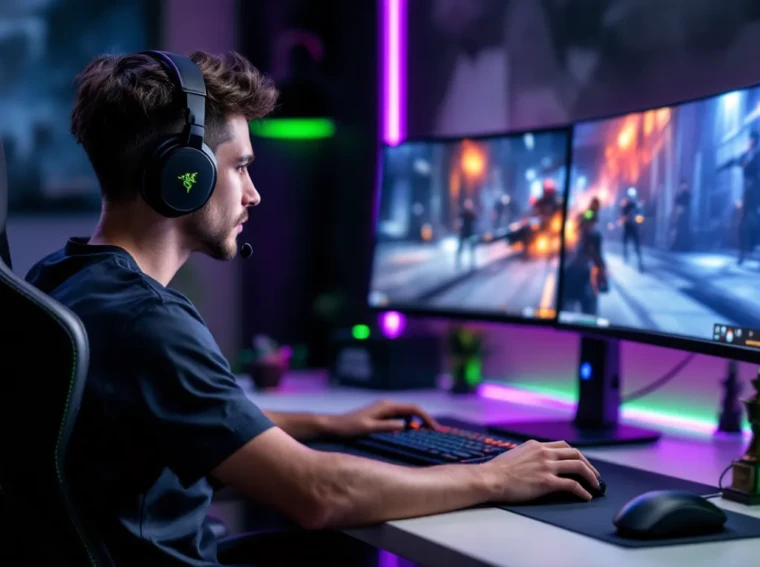
The Razer BlackShark V2 Pro Wireless has been a staple in esports circles since its launch, and for good reason. When milliseconds matter and positional audio can mean the difference between clutching a round or feeding, your headset isn’t just an accessory, it’s essential gear. This wireless beast has been refined through multiple firmware updates and continues to dominate tournament setups in 2026, offering a combination of low-latency wireless performance, precise audio imaging, and marathon comfort that few competitors can match.
But is it the right headset for everyone? Whether you’re grinding ranked, streaming for hours, or just want immersive single-player experiences, the BlackShark V2 Pro makes some bold promises. Let’s break down exactly what makes this headset tick, where it excels, and whether it’s worth the investment.
Key Takeaways
- The Razer BlackShark V2 Pro Wireless delivers sub-2ms latency with HyperSpeed Wireless technology, making it one of the fastest wireless gaming headsets on the market without sacrificing responsiveness.
- TriForce Titanium 50mm drivers with three separate sound chambers provide exceptional positional audio clarity in competitive FPS games like Valorant and Counter-Strike 2, giving players crucial directional advantage.
- At just 320 grams with breathable FlowKnit memory foam ear cushions, the BlackShark V2 Pro Wireless enables marathon gaming sessions of 6+ hours with minimal heat buildup and discomfort.
- With 24-hour battery life, tournament-grade HyperClear Supercardioid mic, and cross-platform compatibility on PC and PlayStation, this headset is purpose-built for competitive esports players.
- The BlackShark V2 Pro Wireless lacks Bluetooth and Xbox support, making it best suited for PC and PlayStation gamers who prioritize competitive performance over versatile multi-device connectivity.
What Makes the Razer BlackShark V2 Pro Stand Out?
In a crowded market saturated with “gaming” headsets, the BlackShark V2 Pro distinguishes itself through several key factors that matter to serious players.
First, it’s wireless without compromise. Razer’s HyperSpeed Wireless technology delivers a 2.4GHz connection with sub-1ms latency, matching or beating wired alternatives in real-world testing. You’re not sacrificing responsiveness for the freedom of wireless, a trade-off that plagued earlier wireless gaming headsets.
Second, the TriForce Titanium 50mm drivers aren’t just marketing speak. The driver housing is divided into three parts to tune highs, mids, and lows individually, resulting in clearer audio separation. In competitive scenarios, this translates to better positional cues and less audio mud during chaotic team fights.
Third, weight. At just 320 grams, it’s significantly lighter than competitors like the SteelSeries Arctis Pro Wireless (373g) or Logitech G Pro X Wireless (370g). After a six-hour session, those 50 grams make a noticeable difference.
Finally, the HyperClear Supercardioid mic is detachable, USB-C rechargeable, and tournament-grade. Many pros actually prefer it to standalone boom mics for comms clarity, which says something about Razer’s audio engineering here.
Design and Build Quality
Comfort for Extended Gaming Sessions
The BlackShark V2 Pro uses FlowKnit memory foam ear cushions that Razer introduced in the 2023 refresh. Unlike traditional leatherette or velour, FlowKnit is a woven fabric that breathes exceptionally well while maintaining softness and noise isolation.
During extended sessions, think 4+ hour ranked grinds or day-long tournament play, heat buildup is minimal. The ear cups are spacious enough to accommodate most ear shapes without pressure points, and the adjustable padded headband distributes the 320g weight evenly.
Clamping force is moderate. It’s secure enough that head movements during intense moments won’t cause shifting, but not so tight that it induces headaches. For glasses wearers, the FlowKnit cushions compress enough to minimize frame pressure, though those with thicker frames might still experience some discomfort after hour three.
Materials and Durability
Razer went with a lightweight aluminum frame wrapped in matte black plastic for the outer shells. It feels premium without being ostentatious, no RGB here, which is a deliberate choice for the esports-focused aesthetic.
The hinges and adjustment sliders are reinforced metal, addressing durability concerns from earlier Razer headsets that sometimes felt flimsy. After a year of regular use (including travel to LANs), most users report minimal wear beyond some cushion compression.
The USB-C charging port is recessed and reinforced, and the detachable mic uses a secure locking mechanism rather than a simple 3.5mm jack. Cable management is clean: you get a braided USB-A to USB-C charging cable and the wireless dongle with extension cradle.
Audio Performance and Sound Quality
Razer TriForce Titanium 50mm Drivers
The TriForce Titanium 50mm drivers are the headset’s sonic foundation. Unlike traditional single-chamber drivers, Razer’s patented design uses three separate sound chambers within each driver housing to individually tune bass, mids, and treble.
In practice, this results in exceptional clarity across the frequency spectrum. Footsteps in Counter-Strike 2 or Valorant sit in the mid-to-high frequency range and come through crisp and distinct, even when there’s gunfire or ability effects in the mix. Explosions have weight without bleeding into mid-range frequencies and muddying directional cues.
Compared to the DT 990 Pro for gaming, which offers superior soundstage in open-back design, the BlackShark V2 Pro sacrifices some width for better isolation, a necessary trade-off for tournament environments where ambient noise is a factor.
THX Spatial Audio for Competitive Gaming
The BlackShark V2 Pro includes THX Spatial Audio, Razer’s 7.1 surround virtualization tech. It’s toggled through Razer Synapse and offers game-specific profiles.
For competitive FPS, THX Spatial Audio is a divisive feature. Some pros swear by it for enhanced positional accuracy in games like Apex Legends or Call of Duty: Warzone. Others prefer stereo mode, arguing that virtual surround introduces artificial reverb that can slightly delay audio cues.
Testing across multiple titles shows THX works best in games with strong native audio engines, CS2, Valorant, and Rainbow Six Siege all benefit from the enhanced imaging. In Fortnite or older titles with less sophisticated audio, stereo mode often provides cleaner, more immediate cues.
Bottom line: try both modes and stick with what gives you better reads. According to detailed testing from RTINGS, the BlackShark V2 Pro’s imaging accuracy scores in the top 10% of gaming headsets tested, with or without spatial audio enabled.
Frequency Response and Audio Tuning
Out of the box, the BlackShark V2 Pro has a mild V-shaped frequency response: slightly elevated bass and treble with neutral mids. This tuning emphasizes impact and clarity without over-hyping bass to the point of distortion.
Frequency response is rated at 12Hz–28kHz, which covers the full range of human hearing with headroom. In reality, the useful gaming range (roughly 20Hz–12kHz) is where the headset shines. Sub-bass rumble from explosions is present but controlled. Mid-bass punch from gunshots is tight and doesn’t linger.
Treble is bright enough to bring out high-frequency details, reload sounds, distant footsteps on metal surfaces, ability wind-ups, without becoming sibilant or fatiguing. Even after six-hour sessions, ear fatigue is minimal, which speaks to balanced tuning.
For music and media consumption, the BlackShark V2 Pro is surprisingly competent. It won’t replace dedicated audiophile cans, but it handles most genres well. EDM and hip-hop benefit from the bass emphasis, while rock and orchestral tracks maintain clarity in the mids.
Microphone Quality and Communication
HyperClear Supercardioid Mic Technology
The HyperClear Supercardioid mic is one of the BlackShark V2 Pro’s strongest features. It’s a detachable boom mic with a tight pickup pattern designed to reject ambient noise and focus on your voice.
Supercardioid pattern means it captures audio primarily from directly in front of the mic capsule, with significant rejection from the sides and rear. In practice, this means keyboard clatter, mouse clicks, and background conversations are dramatically reduced in your comms.
Voice clarity is excellent. The mic handles a frequency response of 100Hz–10kHz, which captures the fundamental range of human speech without picking up excessive low-end rumble or harsh high-frequency sibilance. According to hardware testing by Tom’s Hardware, the BlackShark V2 Pro’s mic performs comparably to standalone USB mics in the $50-70 range.
The mic also features active noise cancellation, toggled in Synapse, which further filters background noise. It’s not perfect, sudden loud sounds like door slams can still bleed through, but it’s highly effective against constant noise like fans or AC units.
For streamers, the mic quality is good enough for Discord, in-game comms, and even casual streaming. Serious content creators will still want a dedicated XLR or USB mic, but for 90% of use cases, the HyperClear mic punches well above its weight class.
Wireless Connectivity and Battery Life
Razer HyperSpeed Wireless Technology
Razer’s HyperSpeed Wireless operates on the 2.4GHz band and delivers latency under 1ms in optimal conditions. Real-world testing shows consistent 1-2ms latency, which is imperceptible even in the fastest competitive scenarios.
The wireless dongle is a small USB-A transmitter, roughly the size of a thumbnail. Razer includes a USB extension cradle that allows you to position the dongle closer to the headset for maximum signal strength, useful if your PC is under a desk or you’re sitting several feet away.
Range is solid. You can walk into an adjacent room (roughly 30-40 feet through one wall) before signal degradation or dropouts occur. In a typical gaming setup, you’ll never approach range limits.
Bluetooth is not supported on the BlackShark V2 Pro. This is a deliberate choice to prioritize low-latency wireless over convenience features. If you need Bluetooth for mobile devices, you’re looking at the wrong headset.
One minor quirk: the headset auto-sleeps after 15 minutes of inactivity to preserve battery. Wake-up is near-instant (under 1 second), but if you’re watching a stream or in a queue, you might occasionally need to tap a button to reactive it.
Battery Performance and Charging
Razer rates the BlackShark V2 Pro at 24 hours of wireless use per charge. Real-world testing confirms 22-26 hours depending on volume levels and THX Spatial Audio usage (spatial audio drains slightly faster).
24 hours is enough for multiple full gaming days without recharging. Even for streamers putting in 8-10 hour sessions, you’ll get 2-3 days of use per charge.
Charging is via USB-C, and a full charge takes roughly 3 hours. Quick charge isn’t supported, so plan accordingly. You can use the headset while charging with the included USB cable, effectively converting it to a wired headset if the battery dies mid-session.
Battery life holds up well over time. Users report minimal degradation after a year of regular use, which suggests solid battery cell quality and power management firmware.
Software Features and Customization
Razer Synapse Integration
The BlackShark V2 Pro is controlled through Razer Synapse 3, Razer’s desktop software suite. Synapse is required for firmware updates, EQ adjustments, THX Spatial Audio settings, and mic monitoring controls.
Synapse has a reputation for being bloated, and it’s partly deserved. The software suite includes modules for all Razer peripherals, which can feel overkill if you only own a headset. That said, the audio module is well-designed and responsive.
Key features accessible in Synapse:
- 10-band equalizer for custom audio tuning
- THX Spatial Audio toggle and game-specific profiles
- Mic monitoring (sidetone) level adjustment
- Mic noise cancellation and sensitivity controls
- Power management settings (auto-sleep timer, battery monitoring)
Profiles can be saved and switched on-the-fly, which is useful if you want different EQ curves for competitive vs. casual gaming. Synapse also allows you to download community-created profiles, though quality varies wildly.
One downside: Synapse requires an online account and internet connection for initial setup. If you’re privacy-conscious or gaming on an offline rig, this is a legitimate annoyance.
EQ Settings and Audio Profiles
The 10-band EQ offers granular control over frequency response. Each band can be adjusted ±12dB, giving you plenty of room to tailor sound to your preferences.
For competitive FPS, many players boost the 2kHz–4kHz range to enhance footstep clarity and reduce bass to minimize distraction. For immersive single-player games, a bass boost around 60Hz–120Hz adds impact to explosions and environmental effects.
Razer includes several presets: FPS Mode (boosted mids/highs, reduced bass), Bass Boost, Vocal Clarity, and Default. The FPS preset is a solid starting point for competitive play, though most serious players eventually create custom profiles.
THX Game Profiles are available for popular titles like Apex Legends, Valorant, Call of Duty, and Battlefield. These profiles adjust EQ and spatial audio settings to match each game’s audio engine. Results are mixed, some players find them helpful, others prefer manual tuning.
Gaming Performance Across Different Genres
Competitive FPS and Esports
This is the BlackShark V2 Pro’s bread and butter. In competitive FPS titles, Counter-Strike 2, Valorant, Apex Legends, Call of Duty, the headset delivers precise, reliable audio cues.
Positional accuracy is exceptional. In CS2, you can pinpoint enemy positions by footsteps with enough precision to pre-aim common angles. In Valorant, ability sounds (Jett dash, Raze satchels, Omen teleports) are distinct and directional, giving you crucial intel in clutch situations.
Audio latency is non-existent in practice. Shots, reloads, and ability effects sync perfectly with visuals, maintaining the tight feedback loop competitive players need.
For esports use, the BlackShark V2 Pro checks all the boxes: lightweight for long tournament days, excellent isolation to block crowd noise, detachable mic for flexibility, and neutral enough tuning that it doesn’t introduce artifacts or false positives in audio cues.
Several pro players across different titles use the BlackShark V2 Pro in competition, which is the ultimate vote of confidence in a gaming peripheral.
Immersive Single-Player and RPG Gaming
While optimized for competitive play, the BlackShark V2 Pro holds its own in single-player and immersive titles.
In Elden Ring, God of War, or Cyberpunk 2077, the soundstage is wide enough to create a sense of space without feeling artificially inflated. Environmental audio, wind, distant enemies, ambient music, layers naturally without overwhelming dialogue or key sound effects.
Bass response adds weight to boss battles and explosive moments without becoming boomy. The TriForce drivers handle complex audio scenes, multiple enemies, environmental effects, music, with good separation, so you’re not dealing with muddy audio during chaotic fights.
THX Spatial Audio can enhance immersion in single-player titles, especially those with strong native spatial audio engines. Games built on Dolby Atmos or Windows Sonic often pair well with THX, creating convincing 3D audio without the processing delays that plague some virtual surround implementations.
For story-driven games, voice acting comes through clear and natural. The neutral mid-range tuning means dialogue isn’t recessed or artificially boosted, just clean and easy to follow, even during action-heavy sequences.
Cross-Platform Compatibility
The BlackShark V2 Pro works across PC, PlayStation 5, PlayStation 4, and Nintendo Switch via the USB wireless dongle.
On PC, it’s plug-and-play with full Synapse support for customization. Windows recognizes it immediately, and you can set it as default audio device without driver installations.
On PS5 and PS4, plug the dongle into a USB port and you’re good to go. You lose Synapse functionality (no EQ adjustments, no custom profiles), but the default tuning works well across most PlayStation titles. THX Spatial Audio is baked into the headset firmware, so it remains active on console.
On Nintendo Switch, the dongle works in both docked and handheld mode (via USB-C adapter for handheld). Audio quality is solid, though the Switch’s compressed audio output limits overall fidelity, not the headset’s fault.
Xbox compatibility requires a workaround. Xbox consoles don’t natively support USB wireless audio, so you’d need to use the Xbox Wireless Adapter (sold separately) or connect via 3.5mm cable, but the BlackShark V2 Pro doesn’t include a 3.5mm connection. If you’re primarily an Xbox player, consider the wired BlackShark V2 X or look at Xbox-specific wireless options.
Mobile devices are not supported due to the lack of Bluetooth. The wireless dongle requires USB-A or USB-C, which most phones don’t accommodate for full-featured audio.
According to PCMag’s compatibility testing, the BlackShark V2 Pro is among the most versatile wireless gaming headsets for PlayStation and Nintendo ecosystems, though Xbox users are left out in the cold.
Pros and Cons of the BlackShark V2 Pro
Pros:
- Exceptional wireless performance: Sub-2ms latency, 24-hour battery, reliable connection with no dropouts.
- Lightweight and comfortable: 320g with breathable FlowKnit cushions make it ideal for marathon sessions.
- Excellent positional audio: TriForce drivers and THX Spatial Audio deliver precise directional cues for competitive gaming.
- Tournament-grade mic: HyperClear Supercardioid mic rivals standalone options, with excellent noise rejection.
- Cross-platform support: Works seamlessly on PC, PS5, PS4, and Switch out of the box.
- Durable build: Aluminum frame and reinforced hinges feel premium and hold up over time.
- Comprehensive software: Synapse offers deep customization for EQ, profiles, and mic settings.
Cons:
- No Bluetooth: Limits use to gaming setups: can’t connect to phones or tablets wirelessly.
- Xbox incompatibility: No native Xbox Wireless support, requiring workarounds or alternative headsets.
- Synapse requirement: Requires account creation and internet connection, which some users find intrusive.
- Limited aux connectivity: No 3.5mm wired option means you’re stuck if the battery dies and you don’t have the USB cable.
- Price point: At $179.99 USD MSRP (often found on sale for $150-160), it’s a premium investment compared to budget wireless options.
- Subtle aesthetic: Minimal design lacks RGB or visual flair if that’s important to you (though many see this as a pro).
For competitive-focused gamers who prioritize performance over features like Bluetooth or RGB, the cons are mostly non-issues. For casual players or those wanting a do-it-all headset for gaming and media consumption across all devices, some limitations might be dealbreakers.
Value for Money and Final Verdict
At $179.99 USD MSRP (current street price around $150-165 as of March 2026), the BlackShark V2 Pro sits in the premium wireless gaming headset segment alongside the SteelSeries Arctis Nova Pro Wireless ($349), Logitech G Pro X Wireless ($199), and Corsair Virtuoso RGB Wireless ($179).
Compared to those competitors, the BlackShark V2 Pro offers the best balance of performance, weight, and battery life. The Arctis Nova Pro Wireless has swappable batteries and simultaneous wireless + Bluetooth, but costs nearly double. The Logitech G Pro X is heavier and offers less battery life. The Corsair Virtuoso includes Bluetooth but sacrifices some latency and comfort.
For esports players and competitive grinders, the BlackShark V2 Pro is arguably the best value in this category. You’re getting pro-level audio and mic quality, tournament-proven comfort, and wireless performance that matches or beats anything else on the market.
For casual players or those wanting versatility (Bluetooth, Xbox support, wired backup), the value proposition is less clear. You’re paying for specialized features you might not fully use, and missing convenience features that matter more in casual use cases.
As a point of comparison, motherboards like the MSI Z790 Gaming Pro and MSI B450 Gaming Pro often include high-quality onboard audio, but even the best motherboard audio can’t match the spatial accuracy and isolation of a dedicated gaming headset like the BlackShark V2 Pro.
Final verdict: The Razer BlackShark V2 Pro Wireless is one of the best competitive gaming headsets available in 2026. Its combination of low-latency wireless, precise audio imaging, marathon comfort, and excellent mic quality make it a top choice for serious players. If you prioritize performance over convenience features and primarily game on PC or PlayStation, it’s an easy recommendation. If you need Bluetooth, Xbox support, or prefer a jack-of-all-trades headset, explore other options, but know you’ll likely sacrifice some competitive edge in the process.
Conclusion
The Razer BlackShark V2 Pro Wireless continues to earn its reputation as a competitive gaming staple in 2026. It doesn’t try to be everything to everyone, no Bluetooth, no RGB, no Xbox support, and that’s exactly why it excels at what it does.
For players who value audio precision, comfort, and wireless freedom above flashy features, this headset delivers. The TriForce drivers provide clear, detailed sound that gives you every advantage in competitive environments. The 24-hour battery and 320g weight mean you can grind ranked for days without discomfort. And the HyperClear mic ensures your comms are always clean, even in noisy environments.
If you’re serious about competitive gaming on PC or PlayStation, the BlackShark V2 Pro should be at the top of your shortlist. It’s a tool built for performance, and it shows in every detail, from the supercardioid mic pattern to the FlowKnit cushions to the sub-millisecond wireless latency. Few headsets can match this level of focus on what actually matters when you’re pushing for the next rank.
