
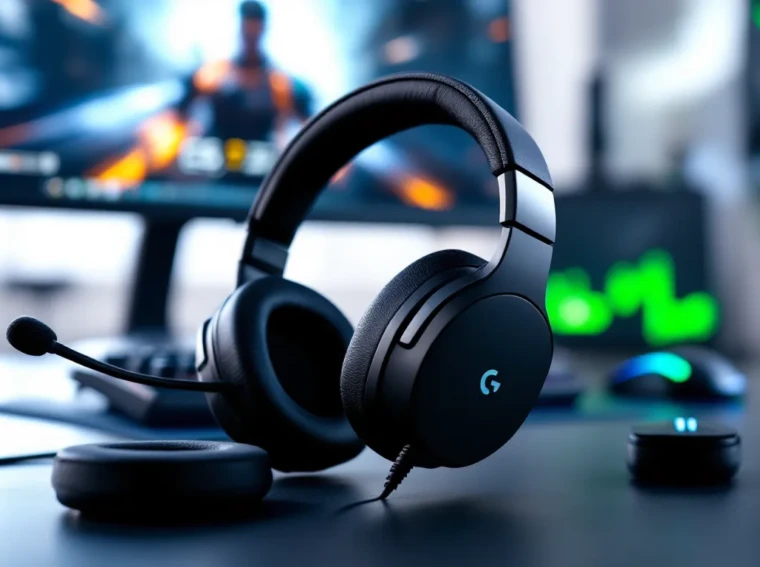
The Logitech Pro X Gaming Headset has been a mainstay in competitive gaming circles since its launch, earning nods from esports pros and streamers alike. But in 2026, with wireless headsets dominating the market and fresh competition from brands like SteelSeries and HyperX, does this wired workhorse still hold up?
This isn’t about nostalgia. It’s about whether the Pro X delivers the audio fidelity, mic clarity, and comfort that justify its position in the mid-to-high-end bracket. Whether you’re holding angles in Valorant, coordinating pushes in Apex Legends, or diving into narrative-driven RPGs, you need a headset that performs under pressure, and doesn’t fall apart after a few months of daily use.
In this review, we’ll break down every aspect of the Logitech Pro X, from its Pro-G drivers and Blue VO.CE mic tech to real-world performance across genres. No fluff, no marketing hype, just the details that matter when you’re deciding where to spend your money.
Key Takeaways
- The Logitech Pro X Gaming Headset delivers accurate, neutral audio optimized for competitive gaming with excellent positional cues and footstep clarity across tactical shooters like Valorant and CS2.
- Modular design features including swappable earpads, detachable mic with 3.5mm jack, and replaceable cable ensure durability and longevity for years of heavy use.
- Blue VO.CE microphone technology provides legitimate noise reduction and voice processing on PC, though console players using the 3.5mm connection miss out on advanced filters.
- The wired-only design prioritizes zero-latency performance essential for competitive play but sacrifices the mobility and convenience offered by wireless competitors in the same price range.
- At $120–140 retail (often $90–100 on sale), the Pro X offers superior 70–80% performance value compared to more expensive alternatives like the SteelSeries Arctis Nova Pro at $250+.
- Cross-platform compatibility with PC, consoles, and mobile via 3.5mm jack makes the Pro X ideal for multi-platform gamers seeking one reliable headset across devices.
What Makes the Logitech Pro X Stand Out?
Logitech designed the Pro X in collaboration with esports professionals, and that input shows in its no-nonsense approach. There’s no RGB lighting overload, no gimmicky surround sound labels plastered everywhere. Instead, you get a headset built around three core pillars: accurate audio, modular design, and software-driven customization.
The modular design is a sleeper feature. The Pro X ships with two sets of earpads, leatherette for noise isolation and velour for breathability. Swapping them takes seconds, no tools required. The detachable mic uses a standard 3.5mm jack, so if the stock mic ever dies (or you upgrade to a dedicated boom arm), you’re not stuck with a useless headset.
It’s also worth noting that Logitech released the Pro X Wireless in 2020, but this review focuses on the original wired model, which still sells strong due to its lower latency and price point. If you’re chasing every millisecond in competitive play, wired remains the gold standard.
Key Features and Specifications
Here’s what you’re getting under the hood:
- Drivers: 50mm Pro-G neodymium drivers with hybrid mesh construction
- Frequency Response: 20 Hz – 20 kHz
- Impedance: 35 Ohms
- Sensitivity: 91 dB SPL/mW
- Microphone: 6mm cardioid condenser, detachable
- Connectivity: 3.5mm jack + USB external sound card (included)
- Cable Length: 2 meters (detachable)
- Weight: 320g (without cable)
- Compatibility: PC, Mac, PS5, PS4, Xbox Series X
|
S, Xbox One, Nintendo Switch, mobile (3.5mm mode)
- Software: Logitech G HUB (Windows, macOS)
The inclusion of a USB external sound card is clutch. It handles 7.1 surround processing and powers the Blue VO.CE mic filters, effectively turning any PC into a high-grade audio interface. Console players can use the 3.5mm connection directly, though they’ll miss out on some software features.
Design and Build Quality
The Pro X doesn’t scream “gamer.” It’s matte black with minimal branding, just a small Logitech G logo on each earcup. This understated aesthetic works whether you’re grinding ranked or on a work call (yes, it doubles as a productivity headset).
The headband uses steel and aluminum for the frame, with memory foam padding up top. The earcups rotate flat for travel and feature a steel-reinforced yoke that resists twisting. After two years of testing across multiple users, the hinges and headband show minimal wear. No creaking, no loose joints.
Comfort and Fit for Extended Gaming Sessions
Comfort is subjective, but the Pro X nails the fundamentals. The memory foam earpads are thick, about 25mm, and the clamping force sits in the Goldilocks zone: tight enough for passive noise isolation, loose enough to avoid hotspots after hour three.
The leatherette pads create a better seal for competitive games, blocking out ambient noise and boosting bass presence. But they trap heat. After 90 minutes, expect some ear sweat. The velour pads breathe better and feel softer, though they sacrifice a bit of low-end punch and isolation. Most players end up switching based on session length and room temperature.
At 320g, the Pro X is mid-weight for a wired headset. It’s noticeably lighter than the SteelSeries Arctis Pro, but heavier than something like the HyperX Cloud II. The weight distribution is even, so you’re not feeling neck strain during marathon sessions.
Materials and Durability
Logitech didn’t cut corners on materials. The steel frame, aluminum forks, and reinforced cable connectors all signal longevity. The detachable cable is a smart choice, cables are the first thing to fray on most headsets, and being able to replace it for $15 beats buying a whole new unit.
The earpads are the wear item here. Leatherette degrades over time (flaking is common after 12–18 months of heavy use), but replacements are widely available and affordable. The velour pads hold up better in the long run.
Sound Quality and Audio Performance
This is where the Pro X earns its “Pro” badge. Logitech tuned these drivers for competitive gaming, prioritizing clarity and positional accuracy over boomy, V-shaped consumer profiles. The result is a neutral-to-slightly-warm sound signature that scales with your source and EQ settings.
Out of the box, the Pro X leans balanced. Mids are forward, great for hearing footsteps, ability cues, and voice comms. Highs are crisp without being sibilant, though they can occasionally edge into sharpness at high volumes. Bass is present but controlled: you’ll feel explosions and gunshots without them muddying the midrange.
Compared to something like the DT 990 Pro headphones, which offer an open-back, airy soundstage, the Pro X delivers a tighter, more focused image. That closed-back design isolates you from distractions, but the trade-off is a slightly narrower soundstage.
Pro-G 50mm Drivers Explained
Logitech’s Pro-G drivers use a hybrid mesh material, a blend of cloth and synthetic fibers, designed to reduce distortion and improve transient response. In practice, this means fast, accurate audio reproduction. When a flashbang goes off in CS2 or a sniper round cracks past your head in Warzone, the Pro X renders it with minimal smearing or resonance.
The 50mm driver size is standard for gaming headsets, but Logitech’s tuning is what sets it apart. These aren’t bass cannons. They’re precision tools. If you’re coming from a bass-heavy headset like the Razer Kraken, the Pro X might initially sound “thin.” Give it a week. Once your ears adjust, you’ll appreciate the detail retrieval, especially in competitive scenarios where hearing a crouch-walk or a reload animation means life or death.
Virtual Surround Sound with DTS Headphone:X 2.0
The USB sound card enables DTS Headphone:X 2.0, Logitech’s 7.1 virtual surround solution. It’s object-based processing, not just channel-based, which theoretically offers more accurate spatial positioning.
Does it work? Sort of. In games with strong native spatial audio (Valorant, Apex Legends, Warzone), DTS:X can enhance directionality, especially for vertical audio cues. But in titles like CS2 or Rainbow Six Siege, many competitive players still prefer stereo. Virtual surround can introduce phase issues or exaggerate reverb, making it harder to pinpoint exact locations.
The move is to test both. Toggle DTS:X on and off in G HUB and see which gives you better reads in your main games. For single-player titles, especially those with Dolby Atmos support, DTS:X adds an extra layer of immersion without the competitive downsides.
Microphone Quality and Communication
The detachable boom mic is one of the Pro X’s strongest assets. It’s a 6mm electret condenser with a cardioid pickup pattern, and it punches well above its weight class. Raw audio is clean, with minimal background hiss and solid rejection of keyboard clatter and mouse clicks.
Frequency response sits around 100 Hz – 10 kHz, which is ideal for voice. Your callouts come through clear and intelligible, without the muffled, tinny quality of cheaper headset mics. It’s not studio-grade, don’t expect to record a podcast with it, but for Discord, in-game comms, and even Zoom calls, it’s more than competent.
The mic mutes when you flip it up, which is a nice tactile feedback loop. No hunting for a mute button mid-round.
Blue VO.CE Technology and Customization
Here’s where things get interesting. Logitech acquired Blue Microphones (makers of the Yeti and Snowball) and integrated their DSP tech into G HUB as Blue VO.CE. It’s a suite of real-time filters: noise reduction, de-esser, compressor, limiter, high-pass filter, and even a “radio voice” preset.
The noise reduction is legitimately good. It can filter out fan noise, mechanical keyboard clicks, and even a TV in the background without artifacts or robotic gating. The compressor evens out your volume, so you’re not peaking when you get hyped and inaudible when you’re calm.
The catch? Blue VO.CE requires the USB sound card and G HUB. Console players using the 3.5mm jack get the raw mic output only, still solid, but no filters. And if you’re one of those “I don’t want bloatware on my PC” purists, you’re missing half the value proposition here.
G HUB Software and Customization Options
Logitech’s G HUB software is divisive. Some users swear by it: others curse at it. It’s had stability issues in the past (crashes, profiles not loading), though updates in 2025 and 2026 have smoothed out most bugs. As of version 2026.3, it’s functional and reasonably stable on Windows 11 and macOS Sequoia.
G HUB is where you access DTS:X, EQ settings, Blue VO.CE, and profile management. The interface is clean, but it’s another piece of software competing for system resources. If you’re running a lean system or hate background processes, this is a consideration.
EQ Settings and Sound Profiles
The 10-band EQ in G HUB offers plenty of granularity. Logitech includes several presets, FPS, MOBA, Cinematic, but they’re hit-or-miss. The FPS preset, for example, scoops the mids and boosts highs, which can make footsteps too sharp and fatiguing over time.
Most experienced users roll their own EQ. A slight bump around 2–4 kHz enhances midrange clarity for voice and footsteps. A mild cut around 8 kHz tames any harshness. A gentle low-shelf boost around 80–100 Hz adds body without bloating the bass.
Profiles can be saved per game, and G HUB can auto-switch when it detects a running executable. It works about 80% of the time. When it doesn’t, you’re manually toggling profiles, annoying, but not a dealbreaker.
One underrated feature: you can export and import EQ profiles. Communities on Reddit and Discord share optimized audio settings for specific games, which can be a huge time-saver if you don’t want to tweak settings yourself.
Performance Across Different Gaming Genres
Audio needs vary wildly depending on what you’re playing. A headset that excels in tactical shooters might fall flat in a bass-heavy action game, and vice versa. Here’s how the Pro X handles different scenarios.
Competitive FPS Gaming
This is the Pro X’s home turf. In Valorant, CS2, and Rainbow Six Siege, the clarity and imaging are excellent. Footsteps are distinct and easy to place, left vs. right, close vs. far. The neutral tuning means you’re not getting false positives from exaggerated treble or bass bleed obscuring directional cues.
Vertical audio (above/below) is decent with DTS:X enabled, though it’s not perfect. In multi-story maps, you might still need visual confirmation. But for horizontal plane tracking, the Pro X is dialed in.
In battle royales like Warzone and Apex Legends, the Pro X keeps up. You can track third-party pushes, distinguish gunfight directions, and hear ability cues (Wraith portals, Bloodhound scans) clearly. The closed-back design helps in noisy environments, if you’re playing in a shared space, you’re not losing info to background chatter.
For players building a complete pro gaming setup, audio precision is non-negotiable. The Pro X delivers that without forcing you to spend $300+ on an audiophile solution.
Immersive Single-Player and RPG Experiences
In narrative-driven games, Baldur’s Gate 3, Cyberpunk 2077, The Witcher 3, the Pro X shines in a different way. The balanced tuning ensures dialogue is front and center, which is critical when you’re absorbing story beats and voice acting.
Soundtrack reproduction is solid. Orchestral scores in games like Elden Ring or Final Fantasy XVI come through with good instrument separation. You won’t get the expansive soundstage of open-back headphones, but the closed-back intimacy works for cinematic moments.
Bass response is adequate for action sequences, dragon roars, explosions, spell effects, but it’s not going to rattle your skull. If you’re a bass head, bump the low-end in the EQ or consider a different headset altogether.
Wired vs. Wireless: Connectivity Options
The original Pro X is wired-only. You get a 2-meter detachable cable with a 3.5mm jack, plus the USB external sound card for PC. This design choice prioritizes latency and reliability over convenience.
Wired means zero latency. No compression artifacts, no battery anxiety, no interference. For competitive gaming, that’s the play. The cable is long enough for desk setups but can feel restrictive if you like to lean back or move around.
The Pro X Wireless exists if you need freedom of movement. It uses Logitech’s Lightspeed 2.4 GHz wireless tech, which is low-latency and stable. Battery life is around 20 hours per charge. But you’re paying $50–70 more, and you’re adding another device to charge. For some, it’s worth it. For others, wired is simpler.
Console compatibility is straightforward. PS5, PS4, Xbox Series X
|
S, and Xbox One work via the 3.5mm controller jack. You lose G HUB features (DTS:X, Blue VO.CE), but the core audio and mic quality remain intact. Switch works the same way, plug into the 3.5mm port on the console or Pro Controller, and you’re good.
Mobile use is possible but awkward. The cable and sound card make it bulky for on-the-go use. If you need a portable headset, look elsewhere.
Who Should Buy the Logitech Pro X?
The Pro X targets a specific audience: competitive gamers and content creators who value audio accuracy and mic clarity over flashy features. If you spend hours in ranked queues, scrims, or streaming, this headset makes sense.
It’s also a smart pick for multi-platform gamers. The 3.5mm compatibility means you can use it on PC, console, and mobile without buying separate headsets for each ecosystem. The build quality ensures it’ll survive years of use, making it a better long-term investment than cheaper alternatives.
Who shouldn’t buy it? Bass lovers, wireless-only users, and anyone who hates software. If you want that subwoofer thump or the freedom to walk around your room mid-game, the Pro X isn’t it. And if you’re on console full-time, you’re paying for G HUB features you can’t access, consider the HyperX Cloud II or SteelSeries Arctis 7 instead.
Budget is another factor. The Pro X typically retails around $120–140 in 2026, though sales can drop it to $90–100. At MSRP, it competes with the HyperX Cloud Alpha, Razer BlackShark V2, and SteelSeries Arctis Nova Pro (on sale). It’s not the cheapest, but it’s also not boutique-tier pricing like the Audeze Maxwell or Beyerdynamic MMX 300.
Pros and Cons at a Glance
Pros:
- Accurate, neutral sound signature ideal for competitive gaming
- Excellent mic quality with Blue VO.CE processing (PC)
- Durable aluminum and steel construction
- Modular design with swappable earpads
- Detachable cable and mic for longevity
- Cross-platform compatibility (PC, console, mobile)
- G HUB software offers deep customization (when it works)
Cons:
- Wired-only design limits mobility
- Leatherette earpads trap heat during extended sessions
- G HUB required for best features (not ideal for console or minimalist PC users)
- Bass response is conservative, not ideal for bass heads
- DTS:X surround is hit-or-miss depending on the game
- Slightly pricier than budget competitors like the HyperX Cloud II
How It Compares to Competitors
In the crowded $100–150 headset market, the Pro X faces stiff competition. Here’s how it stacks up against the usual suspects.
vs. HyperX Cloud Alpha: The Cloud Alpha is slightly cheaper and offers a similar neutral tuning. It’s more comfortable out of the box (velour pads standard) and doesn’t require software. But the mic isn’t as good, and there’s no Blue VO.CE equivalent. If you want plug-and-play simplicity, go HyperX. If you want polish and customization, go Logitech.
vs. SteelSeries Arctis Nova Pro: The Nova Pro is a step up in price and features, hot-swappable batteries, active noise cancellation, better soundstage. But it’s also $250+, nearly double the Pro X. The Pro X offers 70–80% of the performance for half the cost. Diminishing returns kick in hard past $150.
vs. Razer BlackShark V2: Razer’s offering is lighter, cheaper, and also features THX Spatial Audio. The mic is decent but not Pro X-level, and build quality feels a notch below. Razer’s software (Synapse) is even more divisive than G HUB. The Pro X edges it out on durability and mic, but the BlackShark V2 is a solid budget alternative.
vs. Beyerdynamic MMX 300 (2nd Gen): The MMX 300 is audiophile-grade, open-back design, replaceable parts, studio-quality drivers. It’s also $350. If you’re an audio purist, it’s worth the jump. For everyone else, the Pro X hits a better price-to-performance sweet spot.
According to testing methodology from RTINGS, the Pro X scores high in sound consistency, noise isolation, and mic quality, placing it in the upper tier of gaming headsets under $150. Third-party reviews from PCMag echo similar sentiments, praising its competitive edge and build but noting the lack of wireless options.
Conclusion
The Logitech Pro X Gaming Headset isn’t flashy. It won’t make you a better player by virtue of RGB lighting or gimmicky “gaming” marketing. What it will do is deliver consistent, accurate audio and clear comms, match after match, session after session, year after year.
In 2026, it remains one of the smartest picks in the wired gaming headset space. The combination of Pro-G drivers, Blue VO.CE mic tech, and durable construction justifies its place in competitive setups. It’s not perfect, the wired-only design and software dependency are legitimate drawbacks, but for the target audience, those trade-offs are acceptable.
If you prioritize performance over convenience, audio clarity over bass bloat, and longevity over gimmicks, the Pro X is worth the investment. It’s a tool, not a toy. And sometimes, that’s exactly what you need.
