
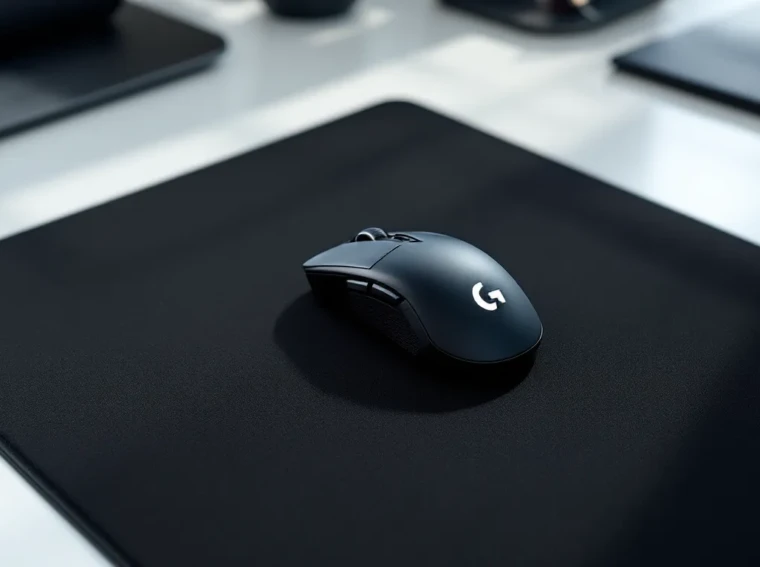
When milliseconds separate victory from defeat, your peripherals matter. The Logitech G Pro X Superlight has dominated competitive gaming since its 2020 launch, and in 2026, it remains a staple in tournament setups from Valorant to Counter-Strike 2. Designed in collaboration with professional esports athletes, this wireless mouse strips away everything that doesn’t contribute to winning, resulting in a 63-gram weapon that feels like an extension of your hand.
But what makes a mouse that’s been around for over five years still relevant? It’s simple: Logitech nailed the fundamentals. The Hero 25K sensor delivers flawless tracking, the wireless tech eliminates latency concerns, and the weight reduction doesn’t sacrifice build quality. This isn’t about flashy RGB or a dozen programmable buttons, it’s about raw performance when it counts. Whether you’re holding angles in tactical shooters or micromanaging in MOBAs, the Superlight is engineered to get out of your way and let you play.
Key Takeaways
- The Logitech G Pro X Superlight wireless gaming mouse weighs just 63 grams, reducing arm fatigue and enabling faster flick shots and precise micro-adjustments in competitive gaming.
- Its Hero 25K sensor delivers pixel-perfect tracking at speeds exceeding 400 IPS with zero smoothing, while Lightspeed wireless technology achieves sub-1ms latency matching wired performance.
- With 70+ hours of battery life and onboard memory that preserves settings without requiring software, the Superlight provides unmatched reliability for professional esports and serious competitive players.
- The mouse features a premium PTFE construction with tensioned mechanical switches rated for 50 million clicks, ensuring durability and consistent actuation even after years of intense use.
- At $150 MSRP, the Logitech G Pro X Superlight is ideal for competitive FPS players and esports professionals, though casual gamers or those needing extensive button bindings may find the premium price and limited side buttons restrictive.
- The Superlight remains the benchmark for lightweight wireless gaming mice in 2026 due to its proven track record in professional tournaments and endorsements from world-champion players across Valorant, Counter-Strike 2, and other major titles.
What Makes the Logitech G Pro X Superlight Stand Out
Featherlight Design Without Compromise
The Superlight lives up to its name with a 63-gram weight that immediately sets it apart from the competition. For context, most wireless gaming mice hover around 80-100 grams. That 20-30 gram difference is palpable during extended play sessions, especially during those high-stakes moments requiring fast flicks and precise micro-adjustments.
Logitech achieved this weight reduction through intelligent engineering. The shell uses a thin but rigid PTFE construction, the battery is optimized for capacity-to-weight ratio, and non-essential features (like side buttons on the right side for ambidextrous use) are eliminated. The result is a mouse that feels almost weightless during sweeping movements but maintains enough heft to avoid feeling cheap or flimsy.
Pro players consistently cite the weight as the primary reason they switch to the Superlight. When you’re making hundreds of micro-adjustments per match, reduced mass translates directly to reduced fatigue. Your arm doesn’t have to work as hard to stop and start movement, which means better control in the late rounds when everyone else is feeling the strain.
Hero 25K Sensor Technology
Under the hood sits Logitech’s Hero 25K sensor, capable of tracking up to 25,600 DPI with zero smoothing, filtering, or acceleration. Most competitive players run far lower sensitivities (400-1600 DPI), but the sensor’s headroom ensures pixel-perfect accuracy at any setting.
The Hero 25K tracks at speeds exceeding 400 IPS (inches per second) with 40G acceleration tolerance. Translation: even the fastest flick shots register accurately. Independent testing shows sub-pixel deviation during rapid movements, which matters when you’re tracking strafing opponents or transferring between targets.
Equally important is the sensor’s power efficiency. The Hero 25K draws significantly less power than previous-generation sensors while maintaining performance, contributing directly to the Superlight’s impressive battery life. Logitech claims up to 70 hours of continuous use on a single charge, and real-world testing consistently backs that up.
Design and Build Quality
Ergonomics and Ambidextrous Shape
The Superlight features a symmetrical, ambidextrous shape that accommodates multiple grip styles. Whether you claw, palm, or fingertip grip, the gentle curves and medium size (125mm x 63.5mm x 40mm) provide consistent support without forcing your hand into a specific position.
The right-handed bias comes from button placement, two programmable side buttons sit on the left side only, with a smooth surface on the right. Left-handed gamers can technically use it, but they’ll sacrifice the side buttons. For right-handed players with medium to large hands, the shape is near-perfect. Those with smaller hands might find the width slightly stretches their fingers in palm grip, though claw and fingertip users typically report no issues.
The mouse feet are zero-additive PTFE, providing smooth glide across cloth and hard pads alike. Out of the box, glide is excellent, though some enthusiasts replace them with aftermarket options for specific pad pairings. The feet are large and well-positioned to maintain balance during movement.
Materials and Durability
The shell construction uses a thin PTFE/polymer blend that feels solid even though its thinness. There’s minimal flex in the main buttons or sides, even when applying deliberate pressure. After months of use, the coating shows minimal wear, no glossy spots developing on the matte finish, which is a common complaint with cheaper mice.
The main buttons use Logitech’s mechanical switch tensioning system with custom switches rated for 50 million clicks. They’re pre-tensioned at the factory to eliminate any pre-travel or post-travel slack, resulting in crisp, consistent actuation. There’s virtually no lateral movement in the buttons, which prevents accidental clicks during lifting or aggressive movements.
Build quality extends to the internals. Teardowns reveal a clean PCB layout with minimal wasted space, premium components, and thoughtful cable routing. The USB-C charging port feels secure without being overly tight. After extensive use, including travel in gaming backpacks, the Superlight shows no rattles, creaks, or performance degradation.
Performance Analysis for Competitive Gaming
Sensor Accuracy and Tracking
The Hero 25K delivers performance that meets or exceeds any competing sensor on the market. Pixel-perfect tracking holds true across the entire DPI range, with no jitter, angle snapping, or smoothing applied. In practical terms, crosshair placement matches hand movement with zero translation errors.
Lift-off distance is configurable between 1mm and 2mm in G Hub software. Most competitive players prefer the 1mm setting to minimize cursor movement when repositioning the mouse. The sensor accurately registers this low height without phantom movement or cut-outs during rapid lifting.
Surface compatibility is excellent. The Hero 25K tracks reliably on cloth pads, hard pads, and even questionable surfaces like wood desks or mousepads with complex patterns. Only highly reflective glass surfaces cause issues, which is standard across optical sensors.
Wireless Performance and Latency
Logitech’s Lightspeed wireless technology operates on a 1ms report rate, matching wired performance. Third-party testing consistently shows sub-1ms click latency (the time between physical click and signal reaching the PC), putting it on par with premium wired mice.
The wireless receiver connects via USB-A. Logitech includes a short extension adapter to position the receiver closer to the mouse, reducing potential interference. In testing, the connection remains stable at distances exceeding six feet, though most competitive setups keep the receiver within a foot or two for optimal performance.
Signal stability is rock-solid. Even in environments with multiple wireless devices (keyboards, headsets, routers), the Superlight maintains connection without dropouts or stuttering. The 2.4GHz frequency hopping handles congested airspace better than early wireless gaming mice, which sometimes struggled in tournament environments.
Click Response and Switch Quality
Click latency measures around 4-6ms from physical actuation to signal, placing the Superlight among the fastest mice available. Combined with the wireless latency, total system latency remains below 10ms, imperceptible during gameplay.
The tensioned mechanical switches provide consistent actuation force across both main buttons. There’s a tactile bump at the actuation point without being overly heavy, making it easy to spam-click or hold for ADS without finger fatigue. The click sound is moderate in volume, not silent, but not loud enough to pick up clearly on voice comms.
Middle mouse button (scroll wheel click) requires slightly more force than the main buttons, which is typical. The scroll wheel itself uses defined steps with moderate resistance, making it easy to count scrolls for weapon switching or ability cycling. Many players link their gaming peripherals to achieve optimal results, and the Superlight integrates seamlessly into a pro gaming setup.
Battery Life and Charging
Logitech’s claim of 70+ hours battery life holds up in real-world use. With RGB disabled (the Superlight has no lighting anyway) and running at moderate DPI settings, expect 65-75 hours between charges. That’s roughly two weeks of heavy gaming or a month for casual users.
The mouse charges via USB-C, a welcome upgrade from the micro-USB standard on many competitors. Charging is relatively quick, a full charge takes about 2.5 hours from empty. More importantly, a 15-minute charge provides several hours of use, making it easy to top up during breaks.
There’s no dock charging option, which some competitors offer. You’ll need to plug in the cable, making the mouse temporarily wired during charging. Logitech doesn’t include a battery indicator on the mouse itself, so you’ll rely on G Hub software or the Windows battery notification to monitor charge levels. Some users find this annoying, though checking battery once every few days isn’t a major inconvenience.
The battery maintains capacity well over time. Users report minimal degradation even after a year or more of regular use, which speaks to the quality of the internal cell and charging circuitry. When compared to audio equipment known for longevity, this performance consistency mirrors what users expect from premium gear like the DT 990 Pro.
Software and Customization Options
G Hub Software Overview
Logitech G Hub serves as the control center for all Logitech gaming peripherals. The interface is clean and relatively intuitive, though it can feel sluggish at times, especially on lower-end systems. G Hub handles DPI configuration, button remapping, lift-off distance adjustment, and firmware updates.
One notable feature: onboard memory stores your settings directly to the mouse. Once configured, you can uninstall G Hub entirely and maintain your settings. This is crucial for LAN events or using the mouse on multiple systems without reinstalling software each time.
Button remapping supports keyboard keys, macros, and media controls. The Superlight only has five programmable inputs (left, right, middle, and two side buttons), limiting complex macro setups compared to MMO mice. For competitive gaming, this simplicity is a feature, not a limitation.
DPI Settings and Profiles
G Hub allows configuration of up to five DPI levels, accessible via a designated DPI button (which you’ll need to assign to one of the existing buttons, reducing available programmable inputs). Each level supports any DPI value from 100 to 25,600 in increments of 50.
Most competitive players run a single DPI setting (commonly 400, 800, or 1600) and adjust in-game sensitivity instead. The ability to store multiple levels is useful for players who want different sensitivities for different games or situations (lower for precision aiming, higher for general navigation).
Profiles can be created per-game, with G Hub automatically switching when you launch specific executables. This works reliably when it works, but G Hub’s application detection occasionally misses game launches or fails to switch back to the default profile. Many users simply set one profile and forget about the auto-switching feature.
According to PCMag’s gaming peripheral reviews, software reliability remains a common pain point across gaming brands, and G Hub is no exception. The functionality is there, but expect occasional quirks.
Gaming Experience Across Different Genres
FPS and Tactical Shooters
This is where the Superlight absolutely shines. The low weight and high-performance sensor make it ideal for Valorant, Counter-Strike 2, Apex Legends, and similar titles that demand precise crosshair placement and fast target acquisition.
The lightweight design excels in low-sensitivity setups common among tactical shooter players. When you’re using 400 DPI with 0.4 in-game sensitivity (a common CS2 config), you’re making large, sweeping arm movements. Reducing mouse weight from 80g to 63g dramatically reduces the effort required to stop those sweeps precisely where you want them.
Click latency and sensor accuracy translate to consistent one-taps and spray control. The wireless connection eliminates cable drag entirely, no more fighting your cable during wide swings or adjusting cable positioning between rounds. Players switching from wired mice consistently report improved comfort and slightly better performance, though the performance difference is marginal at best.
The ambidextrous shape works well for various grip styles popular in FPS communities. Claw grip users get excellent support for the quick, wrist-focused movements used in games like Apex. Palm grip players appreciate the comfort during extended ranked sessions.
MOBA and Strategy Games
The Superlight performs admirably in League of Legends, Dota 2, and RTS titles, though it’s arguably overkill for these genres. The precision sensor and low latency provide benefits during hectic teamfights, helping with accurate ability placement and rapid target selection.
The limited button count (only two side buttons) restricts macro and ability binding compared to MMO-focused mice. Most MOBA players rely heavily on keyboard inputs anyway, so this rarely creates issues. Mapping attack-move or item actives to the side buttons works well.
The lightweight design is less critical here than in FPS titles. MOBA and RTS games involve more precise, smaller movements rather than sweeping arm motions. Players coming from heavier mice might not notice the dramatic difference they’d experience in a tactical shooter.
Click spam for rapid movement commands or last-hitting feels excellent thanks to the tensioned switches. The consistent actuation force means no accidental double-clicks or missed inputs during intense moments. Those building modern systems often pair their peripherals carefully, similar to how they’d select components like the MSI Z790 Gaming Pro for balanced performance.
Comparison with Competitors
The Superlight faces stiff competition in the premium wireless gaming mouse category. Razer Viper V2 Pro weighs 58 grams and offers similar performance with Razer’s Focus Pro sensor. It’s 5 grams lighter, but the shape is more divisive, lower profile and flatter than the Superlight. Street price is comparable ($150-160).
Finalmouse Starlight-12 pushes weight down to 47 grams using exotic materials like magnesium alloy. The performance is excellent, but availability is intentionally limited through drop releases, making it hard to buy. Price fluctuates wildly on secondary markets ($200+).
Pulsar X2 offers a similar shape to the Superlight at 52 grams and costs roughly $100. It’s a strong value proposition with the PAW3395 sensor (essentially equivalent to Hero 25K). Build quality feels slightly less premium, but performance is virtually identical for most users.
Hardware reviewers at Tom’s Hardware consistently rank these mice within a few points of each other in testing. The differences come down to shape preference, brand ecosystem, and specific features rather than raw performance gaps.
What sets the Superlight apart is the combination of proven reliability, widespread availability, and brand trust. Logitech’s support network and warranty service are more accessible than boutique brands. For players who need a replacement quickly before a tournament, walking into a retail store and buying a Superlight off the shelf is possible. Try doing that with a Finalmouse.
The Superlight also benefits from years of pro player endorsements and tournament use. When you see the same mouse in the hands of world champions across multiple titles, it builds confidence in the product. That reputation isn’t marketing hype, it’s earned through consistent performance under pressure.
Pros and Cons
Pros:
- 63-gram weight makes it one of the lightest wireless mice available without sacrificing build quality
- Hero 25K sensor delivers flawless tracking with zero smoothing or acceleration
- Lightspeed wireless matches wired performance with sub-1ms latency
- 70+ hour battery life means charging once every two weeks for most users
- Onboard memory stores settings directly to the mouse, no software required after initial setup
- Ambidextrous shape accommodates multiple grip styles and hand sizes
- PTFE feet provide smooth glide on various mousepad surfaces
- Widely available through retail channels with strong warranty support
- Proven in competition by professional players across multiple esports titles
Cons:
- Premium price ($150-160 MSRP) puts it out of reach for budget-conscious gamers
- Limited buttons (only two side buttons) restricts macro and binding options for MMO/MOBA players
- No RGB lighting if that’s important to your setup aesthetic
- G Hub software can be sluggish and occasionally buggy
- No charging dock included: must plug in USB-C cable to charge
- White version shows wear and discoloration faster than black (cosmetic only)
- Shape might not fit very small or very large hands perfectly
- Right-handed bias due to button placement limits left-handed usability
Testing by TechRadar’s hardware team echoes these points, particularly noting that while the price is high, the performance justifies it for serious competitive players.
Who Should Buy the Logitech G Pro X Superlight
Competitive FPS players are the primary target audience. If you play Valorant, CS2, Apex Legends, or similar titles at a serious level (ranked grinding or tournament play), the Superlight’s combination of weight, sensor performance, and wireless freedom provides measurable advantages. The $150 price tag is justified when you’re chasing every possible edge.
Casual gamers with disposable income who want a premium experience will appreciate the Superlight, though they might not fully use its capabilities. If you play a few hours a week and aren’t particularly sensitive to mouse weight or click latency, a $70 option will serve you fine. But if you value quality and longevity, the Superlight is built to last years.
Esports professionals and aspiring pros already know about this mouse, it’s been a staple in tournament setups since release. The proven reliability and widespread availability make it a safe choice when your livelihood depends on your gear performing flawlessly.
Players building a high-end setup who’ve already invested in premium components will find the Superlight fits naturally into that ecosystem. Much like choosing a quality motherboard such as the MSI B450 Gaming Pro Carbon for your build, peripheral selection matters when you’re optimizing every component.
Who should skip it? MMO and MOBA-focused players who need 10+ programmable buttons should look at mice designed for those genres. Budget gamers can find 90% of the performance for 50% of the price. Left-handed players need a truly ambidextrous option with buttons on both sides. And if you prefer wired connections for philosophical reasons, Logitech offers the G Pro Wired as a lower-cost alternative (though it lacks the weight optimization).
Conclusion
The Logitech G Pro X Superlight remains relevant in 2026 because it executes the fundamentals flawlessly. It doesn’t try to be everything to everyone, no excessive buttons, no RGB light shows, no gimmicky features. Instead, it focuses entirely on what matters for competitive gaming: minimal weight, perfect tracking, zero-latency wireless, and bulletproof reliability.
At $150, it’s an investment. But for serious players who understand how much mouse performance impacts their game, it’s money well spent. The combination of the Hero 25K sensor, 63-gram weight, and Lightspeed wireless creates a package that’s been tested and proven in the most demanding environments imaginable, professional esports.
Years after release, the Superlight continues to appear in pro players’ tournament setups, and that longevity speaks volumes. Gaming peripherals evolve quickly, but genuinely transformative products remain relevant far longer than the typical product cycle. The Superlight earned its place as the benchmark by which other lightweight wireless mice are measured, and in 2026, it’s still setting the standard.